
How Much Marketing Content Can You Generate from One Product Photo? We Tried It with Cheso
From e-commerce visuals and social media posters to AI-generated product videos, here's what happened when we gave Cheso just one product photo.
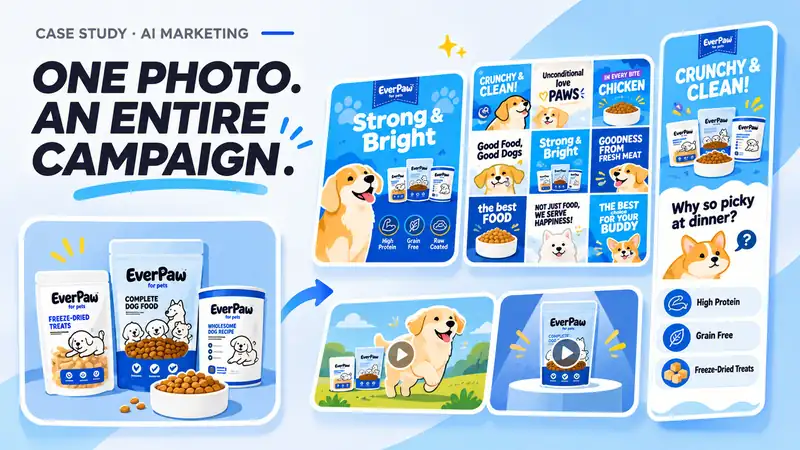
Imagine you've just received a product photo, and now you're expected to turn it into an entire marketing campaign. You need polished product images, e-commerce detail pages, social media posters, short-form videos, and maybe even a few creative ads. The problem? You only have one photo to work with. No massive content library, no elaborate photoshoot, and definitely no unlimited marketing budget.
Sounds like a designer's nightmare, right? But here's a more interesting question: What if that single product photo could become the starting point for everything?
We decided to put that idea to the test. For this experiment, we chose a fictional pet food product concept featuring bright blue packaging, playful dog illustrations, and a friendly visual identity. Using Cheso, we explored how far we could take one original product image, from everyday e-commerce visuals to an entire collection of marketing content.
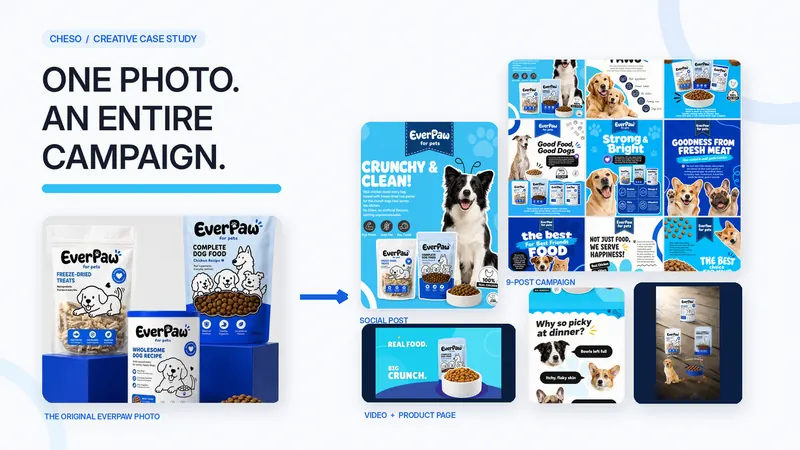
The result was a surprisingly diverse set of creative assets: product photography, detailed shopping graphics, a nine-post social media campaign, long-form product pages, and several AI-generated promotional videos. None of these came from a single magic button, but they all shared the same starting point.
1. It All Started with One Product Photo
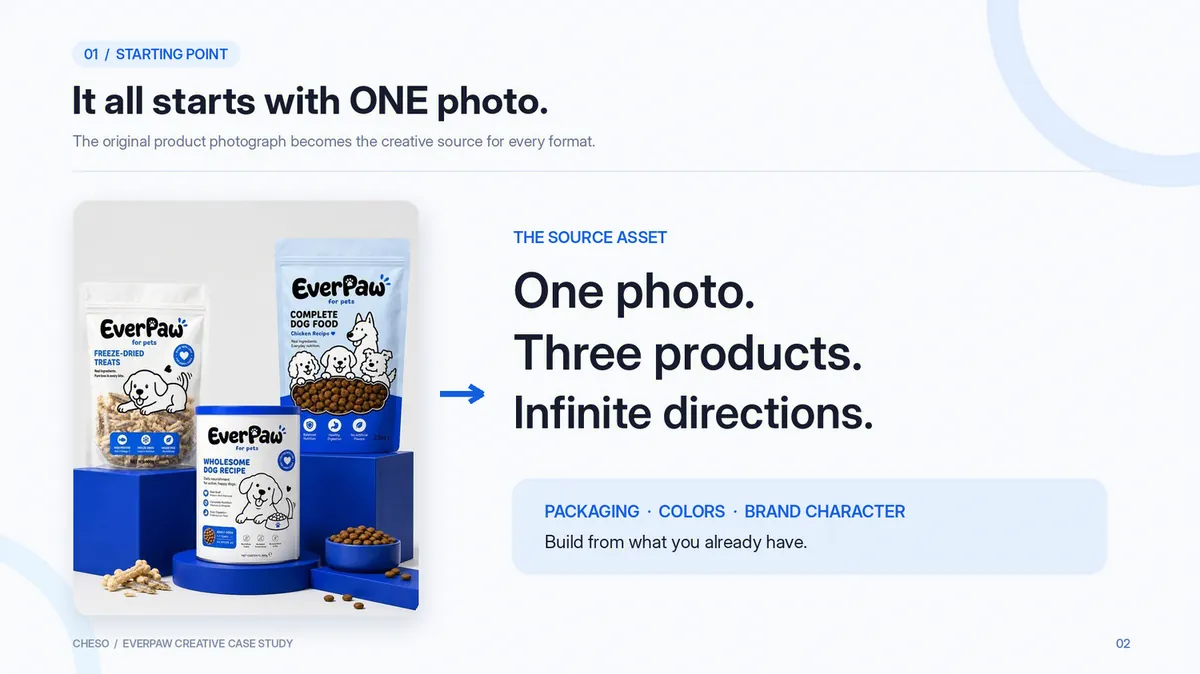
Our starting image was simple: three pet food products displayed against a blue setup, accompanied by a bowl of kibble. There were no professional dog models, no carefully styled living room, and no collection of lifestyle photographs ready to use. It was just a straightforward product shot, the kind of image a small business might already have sitting in its product folder.
Still, the photo contained more useful information than you might expect. The cobalt-blue packaging, clean white backgrounds, illustrated dogs, and friendly typography gave the product a recognizable visual direction. Even without a complete collection of marketing assets, we already had enough information to begin building a consistent look.
We uploaded the image to Cheso with one important instruction: keep the products and visual identity consistent across everything we create. Rather than asking for random beautiful images, we wanted to explore how one visual reference could support different marketing formats while maintaining a shared creative language.
After all, generating ten good-looking images is one thing. Creating ten images that actually look like they belong to the same campaign? That's where things get interesting.
2. First, Let's Make Some E-Commerce Visuals
A single product photo might be enough to introduce an item, but a complete online shopping experience usually needs much more. Customers want to understand what they're looking at, explore product features, and see how the item fits into their everyday lives. That's why we decided to start with the essentials: product photography, detailed shopping graphics, and a longer product presentation.
From a Simple Photo to Product Images
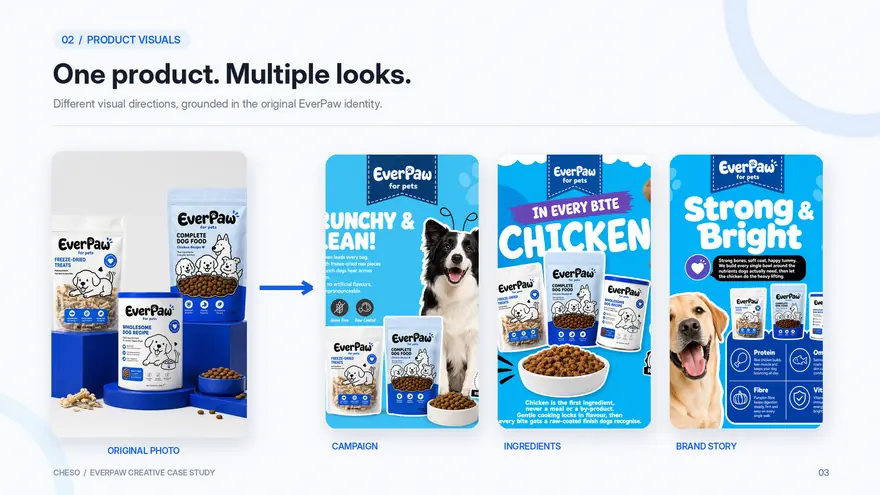
Our first goal was to turn the original photo into a collection of commercial product visuals suitable for different online placements. We experimented with clean studio compositions, alternative backgrounds, different lighting conditions, and more engaging product arrangements. Some images emphasized the packaging itself, while others introduced related elements such as kibble, freeze-dried treats, and friendly dogs.
The key was maintaining a consistent product appearance throughout the process. Packaging shapes, colors, proportions, and recognizable design elements remained important references, even as the surroundings changed. This allowed us to explore different moods without making each image look like it belonged to a completely different product.
And just like that, our one product photo had a whole new wardrobe. Clean and minimal for one use, playful and lifestyle-focused for another, all without requiring a separate photoshoot for every concept.
Then We Made Enhanced Product Detail Graphics
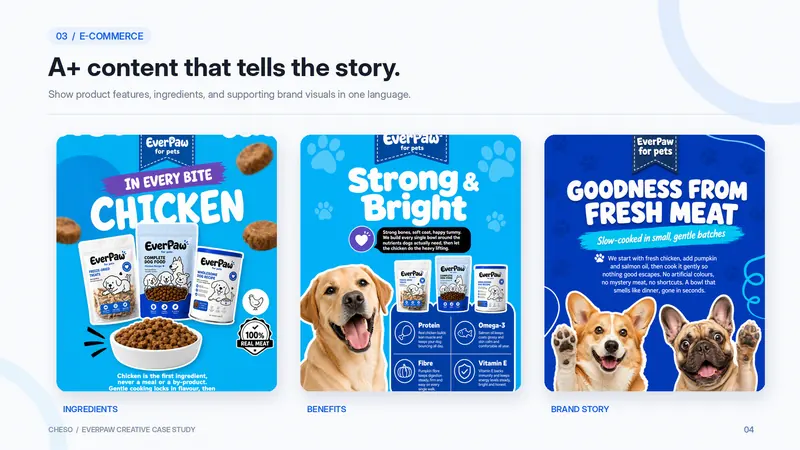
Next came the part that tends to take a little more planning: product detail graphics. These visuals need to do more than simply look attractive. They should organize information, communicate product features, and help customers understand why a product might be relevant to them.
For our pet food concept, we explored layouts focused on ingredients, product characteristics, feeding-related imagery, and product range presentations. To keep everything visually connected, we used bold rounded typography, blue-and-white backgrounds, simple supporting graphics, and realistic animal photography. Each design followed the same overall style while highlighting a different aspect of the product.
This is where AI-assisted design becomes especially useful for exploration. Instead of approaching every information module from scratch, we could build upon an established visual direction and adapt it to different content needs. The result was a collection of enhanced e-commerce graphics that felt connected rather than assembled from unrelated templates.
Of course, a good-looking product page still needs accurate information. Any AI-generated ingredients, nutritional details, feeding recommendations, or product claims should be reviewed against verified product specifications before publication. A beautiful layout is great, but an accurate one is even better.
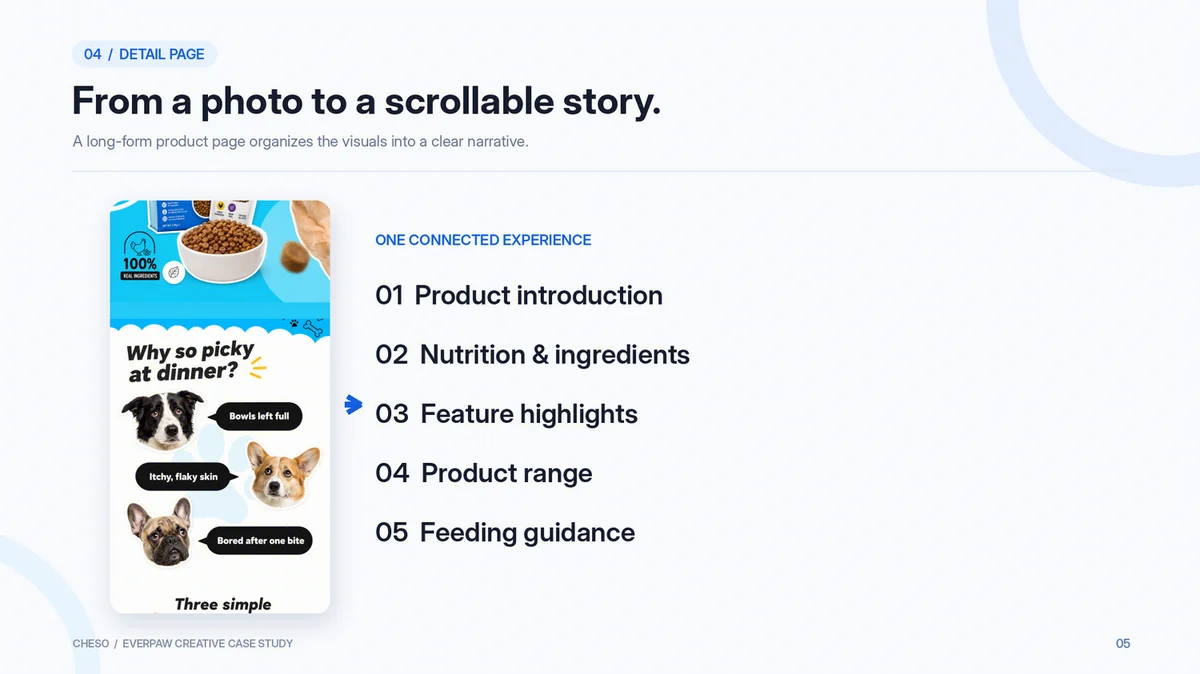
And Yes, We Made a Full Product Detail Page
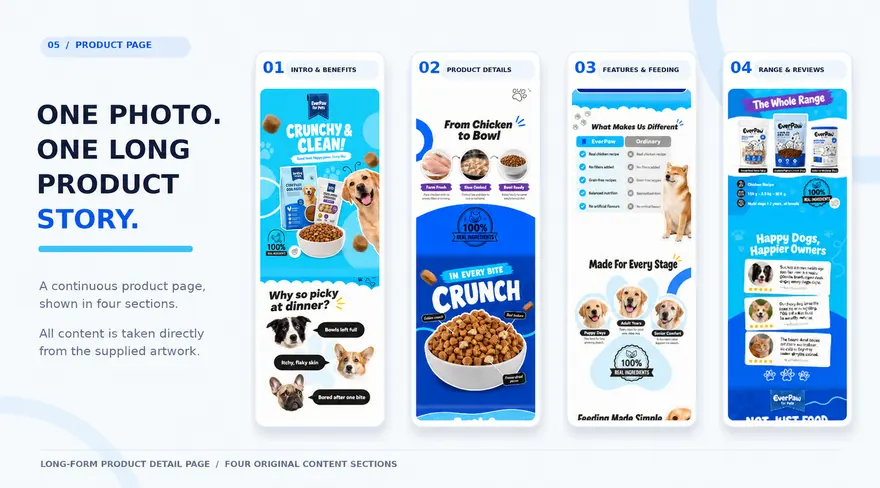
Once we had individual product graphics, the next step was combining them into a complete shopping experience. We created a long-form product detail page that brought together an introduction, ingredient-inspired content, product features, supporting imagery, and product series information within one continuous layout.
Rather than treating each graphic as a separate image, we wanted the entire page to feel like one connected visual story. Consistent colors, typography, spacing, and illustration styles helped create a smoother reading experience as the content moved from one section to the next.
The interesting part was seeing how quickly a collection of smaller visual experiments could evolve into a more comprehensive page design. One starting photograph had now become the foundation for a much larger piece of content.
3. One Product Photo. Nine Social Media Posts.
With the e-commerce visuals taking shape, we moved on to another challenge: social media. A product can have excellent shopping graphics and still need a completely different type of content for its social channels. People scrolling through their feeds aren't necessarily looking for a detailed product explanation. Sometimes, you have just a second to catch their attention.
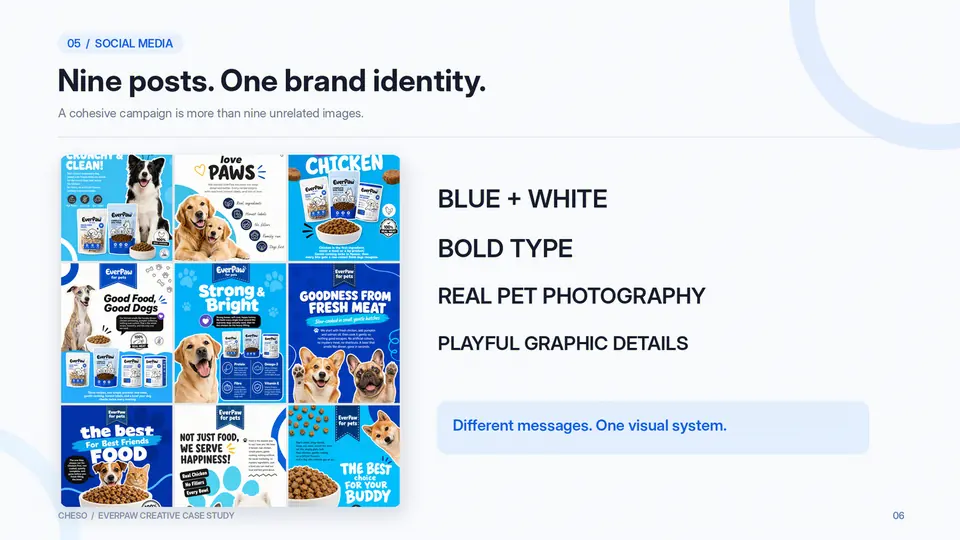
So we asked Cheso to help us develop a nine-post social media campaign using the same product reference. The goal wasn't simply to generate nine posters. We wanted nine distinct visual compositions that could work individually while still feeling like part of the same creative family.
To establish that consistency, we worked with a recognizable set of design elements: saturated blue backgrounds, playful rounded typography, realistic pet photography, clean product cutouts, paw-print graphics, and bold editorial layouts. These elements gave the series a coherent visual language without forcing every poster to follow exactly the same structure.
Some designs placed the packaging front and center, while others focused on dogs, food textures, or expressive headlines. A few used generous white space, and others filled the frame with bright blue and oversized lettering. Together, they demonstrated how one product could support a variety of messages without losing its overall identity.
This experiment highlighted an important distinction in AI-assisted visual creation: producing more images isn't necessarily the same as building better content. What matters is whether those images feel intentional, recognizable, and appropriate for the same campaign.
Achieving that consistency still takes creative direction. We had to specify colors, typography, product positioning, photographic styles, and layout preferences, then review and refine the results. Think of it as giving Cheso a creative brief instead of simply asking it to "make something cool."
Although, let's be honest, we've all tried that prompt at least once.
4. Now Let's Make It Move
By this point, we had created product images, detailed shopping graphics, a long-form page, and a social media campaign. That was already a substantial collection of content, but we wanted to explore one more possibility: turning those static visuals into short-form videos.
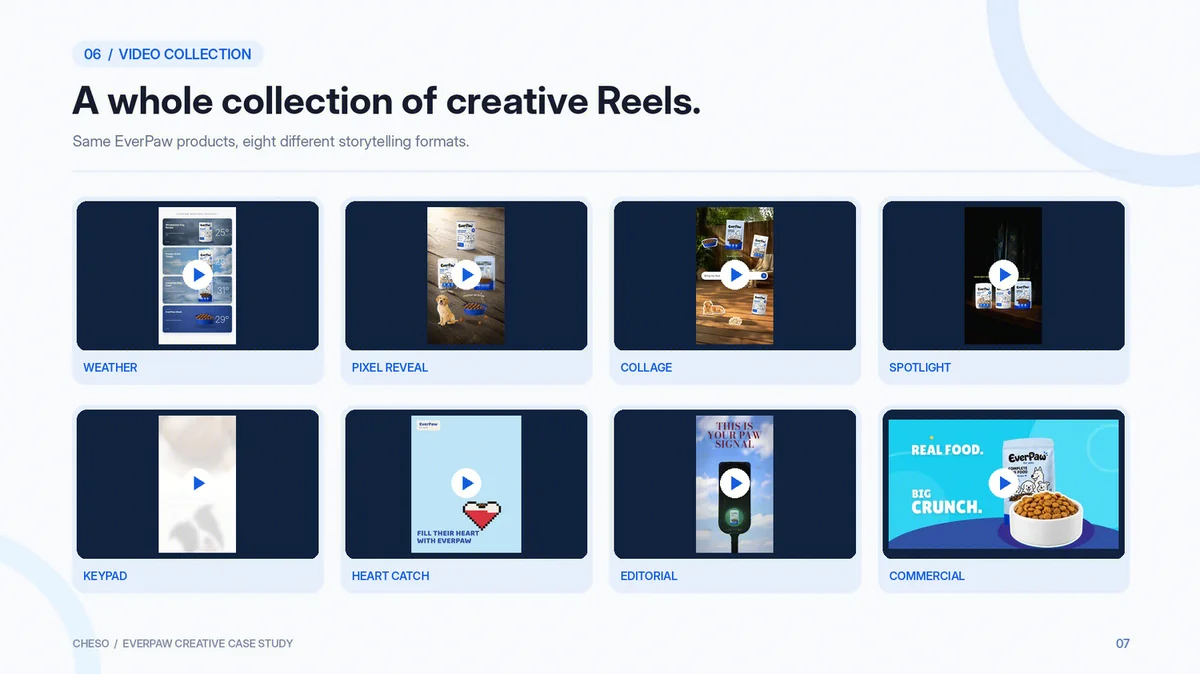
Instead of producing one generic product commercial, we experimented with several creative directions. We used the original product image, selected generated assets, and video-style references to explore different compositions, motion effects, and storytelling approaches. The idea was to see how much variety we could create while keeping the same products at the center of each concept.
Here are a few of the results.
Pixel Reveal: From Pixels to Product Photography
For the second concept, we explored a pixel-to-real transformation. Five product-related elements begin as deliberately low-resolution images, arranged together within a single composition. As a cursor moves across the scene, each element transforms into a sharp, realistic product image, accompanied by curved editorial labels.
The appeal comes from the contrast between the pixelated and realistic versions. Each reveal creates a small moment of visual satisfaction, making the video engaging without requiring complicated camera movements or transitions. Sometimes, the simplest interaction is the most satisfying one to watch.
Spotlight Reveal: Let There Be Light
For a more cinematic direction, we explored a spotlight reveal. Three products sit on a dark display surface, surrounded by a low-lit environment. Individual spotlights illuminate the packaging one by one, while small editorial labels appear to introduce each product.
There are no dramatic camera movements or complicated storylines. Instead, the entire effect relies on carefully controlled lighting, composition, and timing. The result feels more like a polished commercial product presentation, showing how a simple visual concept can create a very different mood.
Three products. Three spotlights. Just enough drama.
And We Didn't Stop There
Beyond these four concepts, we also experimented with keypad-style interactions, playful animated elements, editorial product visuals, and more traditional commercial-style ads. Each explored a different visual approach, but all were developed using the same original product concept and its related assets.
What made this experiment interesting wasn't simply the number of videos we could create. It was the range of creative directions available from the same visual starting point. A product that appeared playful in one Reel could feel polished and cinematic in another, giving us different ways to explore content for different contexts.
5. Okay, But How Do You Actually Do This?
Looking at the finished content is fun, but the more useful question is how to get started. The good news is that you don't need to prepare an enormous creative brief before exploring your first idea. What matters most is having a clear starting image, a reasonably specific goal, and a willingness to refine the results as you go.
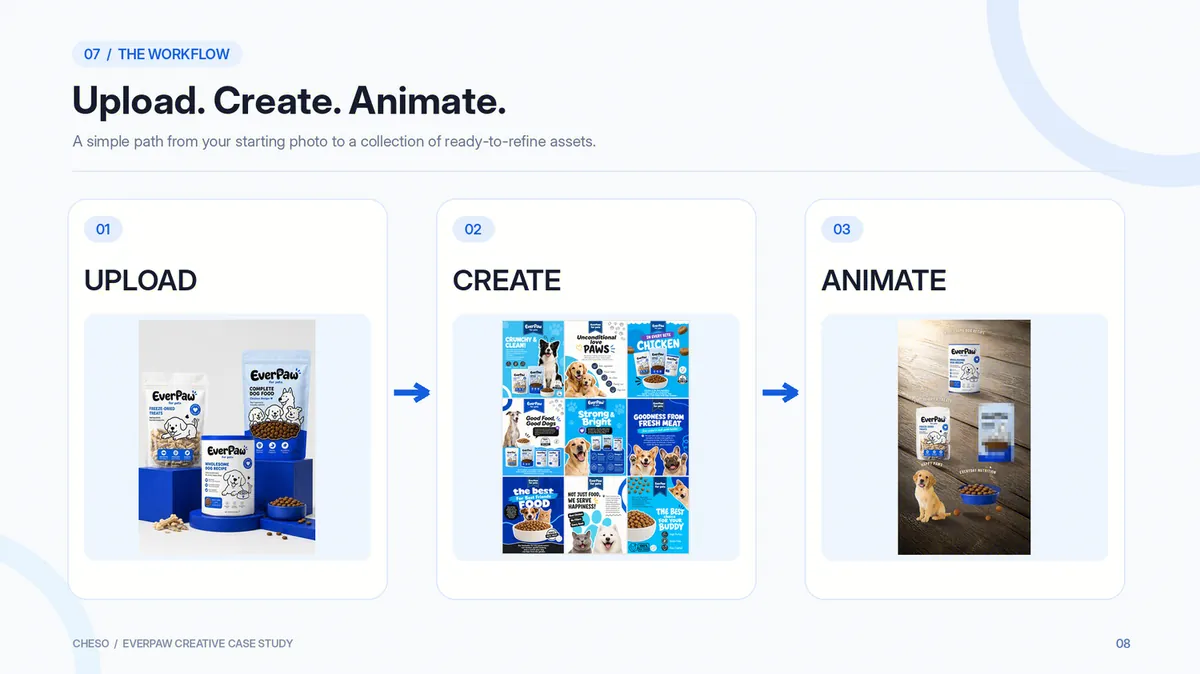
For this experiment, we approached the process in three main steps.
Step 1: Upload Your Product Photo
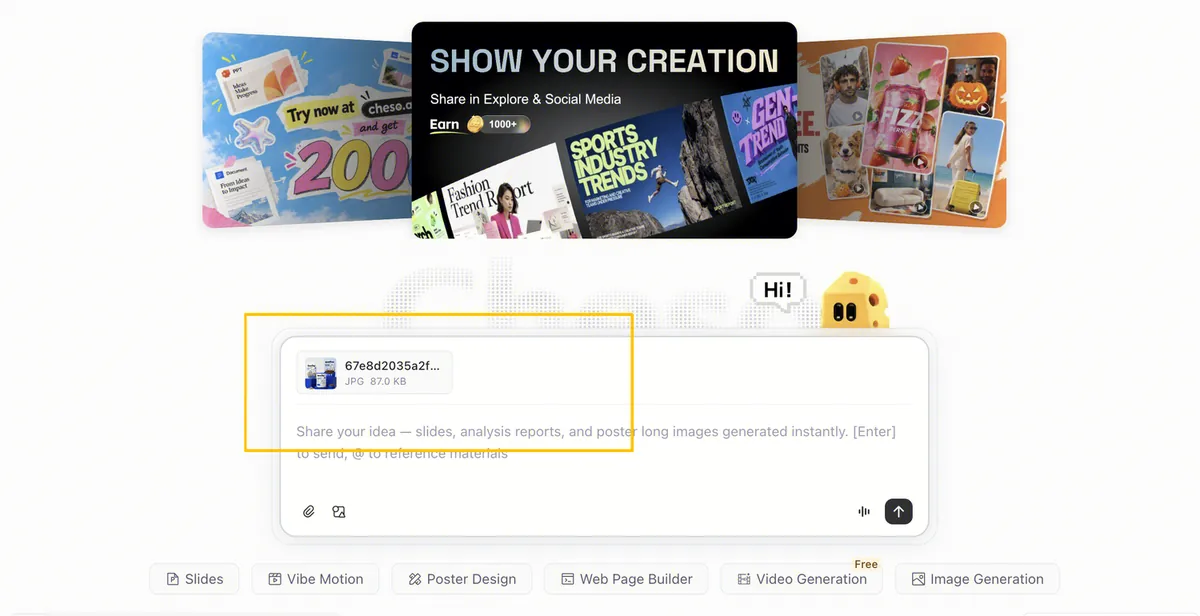
Start by uploading your original product image to Cheso. Ideally, the product should be clearly visible, with recognizable packaging, readable details, and minimal obstruction. A clean reference image gives you a stronger foundation for maintaining visual consistency across different outputs.
If you already have a visual style in mind, you can also provide supporting references, such as previous marketing graphics, preferred layouts, or examples of the photography and illustration style you want to explore. These references help communicate your creative direction more clearly and reduce unnecessary guesswork.
For our pet food experiment, the original product image provided the main visual reference, while additional creative directions helped shape the different outputs.
Step 2: Tell Cheso What You Want to Create
Once your image is ready, decide which type of content you want to make first. Rather than requesting an entire marketing campaign in a single instruction, it's often easier to work through individual content categories, such as product photography, detail graphics, or social media posters.
A useful prompt should explain both what you want to create and what needs to remain consistent. For example, you can specify the product category, required outputs, visual style, preferred color palette, typography, and how the original packaging should be treated.
Here's a prompt you can try.
Use the uploaded product photograph as the primary reference to create a cohesive marketing visual collection for this pet food product.
Generate e-commerce product images, enhanced product detail graphics, and social media posters.
Keep the original product shape, packaging structure, color palette, and proportions consistent.
Use a playful, modern visual identity with bold rounded typography, blue-and-white color combinations, realistic pet photography, and clean commercial layouts.
You may generate additional realistic dogs, kibble, freeze-dried treats, and pet-related visual elements that complement the product.
Avoid inventing product ingredients, nutritional claims, or unsupported benefits.
Once you have a result that fits your direction, use it as a starting point for further refinement. You might adjust the typography, request a different composition, change the background, or adapt an existing design to another format. Working through these decisions gradually can help you build a more consistent collection than treating every output as a completely separate task.
Step 3: Turn Your Images Into Videos
Now comes the part where things get interesting. Choose your original product image or one of the visuals you've already created, then use it as the starting point for a short-form video. You can also provide a reference video to communicate the style of animation, composition, camera movement, or editing rhythm you'd like to explore.
The key is to describe the visual behavior rather than only the overall mood. For instance, if you're trying to recreate a pixel reveal, explain the arrangement of the products, how the cursor moves, and what happens during each transformation. For a cinematic spotlight video, describe the lighting sequence, framing, and timing.
Here's a flexible starting point.
Example Prompt — Creative Product Reel
Create a 9:16 vertical social media product video using the uploaded pet food product image and the provided video reference.
Closely follow the reference video's composition, camera framing, animation sequence, typography, and editing rhythm.
Replace the original products with the pet food products while preserving their packaging shapes, colors, and visual consistency.
You may generate additional photorealistic dogs, kibble, freeze-dried treats, and related product imagery when appropriate.
Keep the final video visually cohesive. Do not introduce unrelated scenes or unnecessary visual effects.
Not every video needs an elaborate prompt, but the more important a particular visual detail is, the more clearly you should describe it. It also helps to build on successful images rather than trying to generate every new result independently.
In other words, one prompt doesn't have to do everything. A strong image can become the foundation for a poster, that poster can inform another design, and a selected visual can become the starting point for a video.
6. Your Next Campaign Might Already Be Sitting in Your Camera Roll
If there's one thing this experiment demonstrates, it's that you don't necessarily need a huge library of product photographs to begin exploring a marketing campaign. Sometimes, a single clear image contains enough visual information to start building something much bigger. The key is understanding your creative goals, maintaining consistency, and treating each generated result as part of an evolving process.
Start with the product you already have, explore a few visual directions, and establish a style that feels appropriate for your audience. From there, you can develop product graphics, social media content, and creative videos that build on the same foundation. The process isn't about replacing every creative decision with AI; it's about giving yourself more room to experiment with those decisions.
One photo doesn't have to remain one photo. It can become a detailed product page, a playful campaign poster, a collection of social media posts, or the starting point for an eye-catching video. With Cheso, you can explore these possibilities and develop your ideas into visual content.
So the next time you're staring at a product photo and wondering what to do with it, try asking a different question: What else could this become?
You might be surprised where it takes you. And if your product happens to be dog food, well, the dogs are probably going to steal the spotlight anyway.
One photo. More possibilities.
Want to explore the full case study? Check it out here: View the Full Case Study