
How to Make a Campus Event Poster with Cheso
Create a campus event poster with Cheso, from brainstorming and AI-generated food visuals to a polished design with clear event details.
Long time no see, friends!
Recently, my sister's school held an International Food Festival, and thanks to her, I got to tag along. Vietnamese pho, Japanese sushi, Thai-style marinated seafood, General Tso's chicken, Korean barbecue... It was a very good day to have an appetite.
Picture a big lawn, that fresh, dewy smell in the air, a beautifully blue sky, and food stalls everywhere. Wander a little, eat a little, repeat. My only complaint? I have exactly one stomach. A serious design flaw for an occasion like this.
Have you been to a food festival like that? How do you choose which stall to try? Your favorite cuisine? The longest line? Whatever smells good enough to interrupt your conversation?
Me? I pay quite a lot of attention to the posters next to the stalls.
My completely unofficial theory is that if someone cares enough to make a beautiful, clear poster, they'll probably put some care into the food, too. Yes, I am judging dinner by its graphic design. We all have our methods.
What makes a food festival poster worth stopping for?
A good poster has a few jobs to do before anyone takes their first bite:
- Look inviting. The colors, type, and images should work together, with enough breathing room that the poster doesn't look like every element arrived at the same time and refused to leave.
- Make the information obvious. What are you selling? How much does it cost? Are there choices for spice level, portion size, or extra toppings? If adding Flamin' Hot Cheetos is an option, I would like to know about it.
- Show something delicious. A steaming bowl of pho can make a much better argument than three paragraphs explaining why you should buy a bowl of pho.
- Give the eye a clear route. The headline should lead, the food should tempt, and the practical details should be easy to find. Too crowded, and my eyes hurt. Too scattered, and I have no idea where to look.
Now, here's where this became my problem.
My sister's friend was running a Japanese yakitori booth. Yakitori, for anyone unfamiliar, is Japanese grilled chicken on skewers—a very persuasive form of chicken. My sister agreed to make the booth's poster in exchange for three skewers.
And then... yes. The actual poster-making landed on her older brother. Me.
My share of the payment? One skewer.
Two-thirds of my compensation, gone before I even opened my laptop. Apparently, my sister is both the client and the tax authority. But what can you do? I'm her brother.
So let's make that one skewer count. Here's how to use Cheso to create a campus event poster, from the first idea to the final design.
1. Tell Cheso what you're making, then brainstorm
You don't need to arrive with a perfectly organized design brief. Talk to Cheso the way you'd explain the job to a friend: what the event is, who's coming, what you're promoting, and the feeling you're going for.
For our booth, I started with this:
Hey! I'm helping out with a food exchange festival on campus, and we're running a Japanese yakitori booth. I wanna make a cool poster to get more students to stop by. Something fun, tasty-looking, and a little Japanese street-food inspired. Let's brainstorm first!
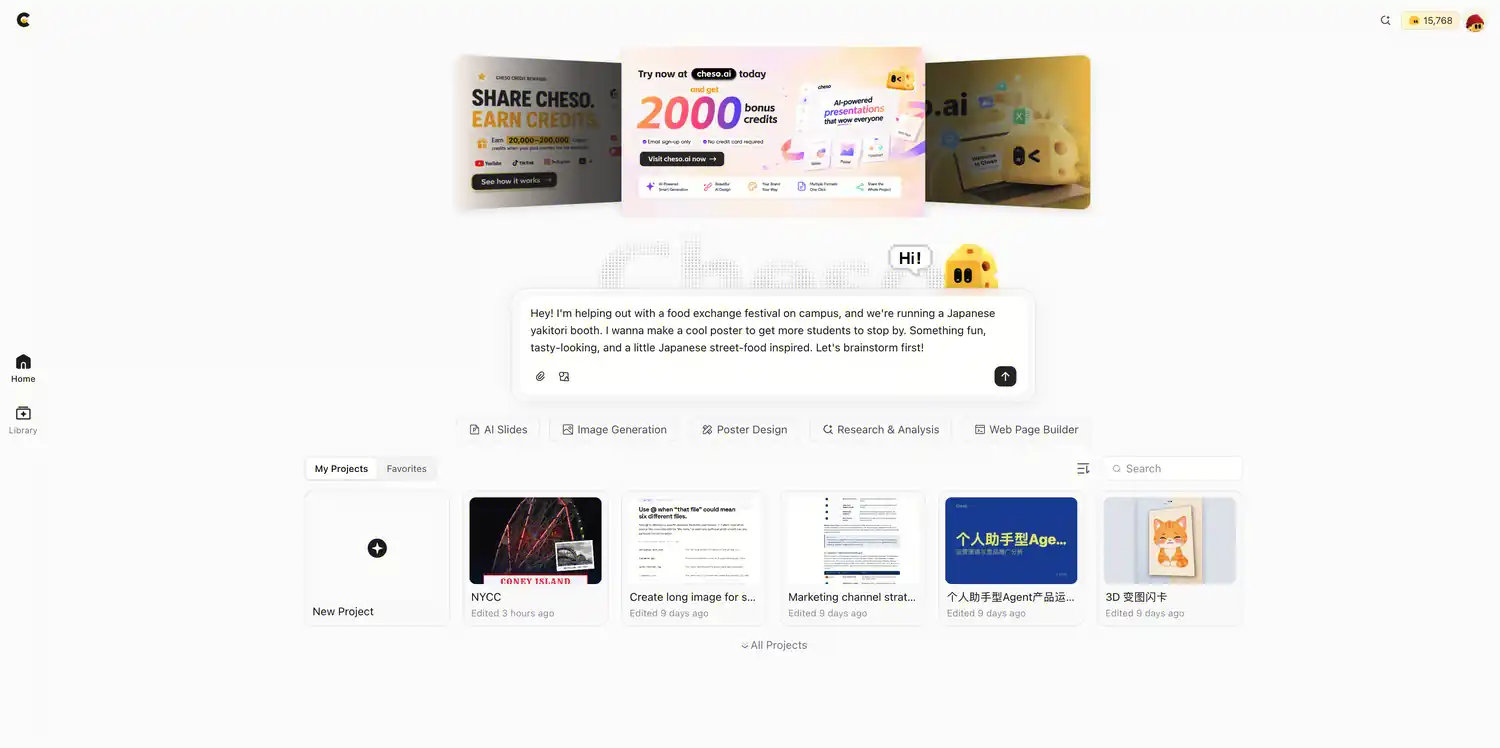
Start with the event, the audience, and the mood. The design details can develop from there.
The useful part of brainstorming first is that "Japanese street food" isn't just one look. A lantern-lit night market, a playful retro stall, and a quieter paper-and-brush style would all tell different stories. Cheso suggests directions before we commit to the full poster.
And oh, I liked one of its tagline ideas. In English, it means "One skewer, straight to the soul."
Quite a dramatic promise for some chicken on a stick. I respect it.
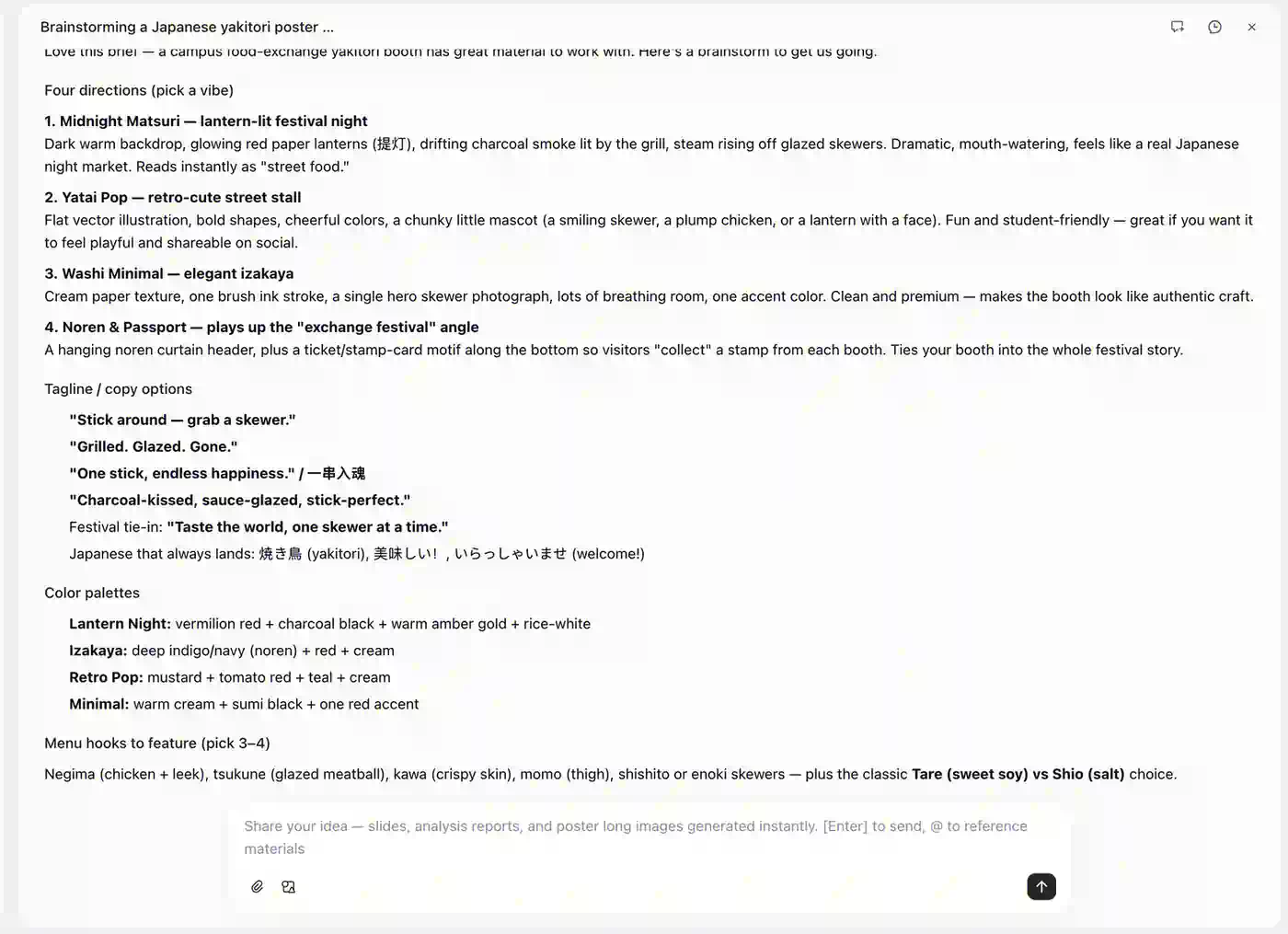
Explore the visual direction and the copy together, so the poster feels like one idea.
For your own event, explain whether the poster is advertising the whole festival or one particular booth. That small distinction changes the headline, the image, and which details deserve the most space.
A campus food stall should feel like an invitation to join the fun—not a restaurant announcing its quarterly expansion strategy.
2. Create the food visuals
As I said earlier, a food poster needs something that makes you hungry.
There was one small problem: my sister's friend hadn't started cooking yet, so we didn't have real yakitori photos. Fortunately, Cheso can generate the food visuals as part of the same conversation.
Here's the next prompt:
Let's make a few visuals first! Can you draw some juicy yakitori skewers sizzling over a charcoal grill, with a bit of smoke and that warm, cozy Japanese food stall vibe? Make them look seriously delicious!
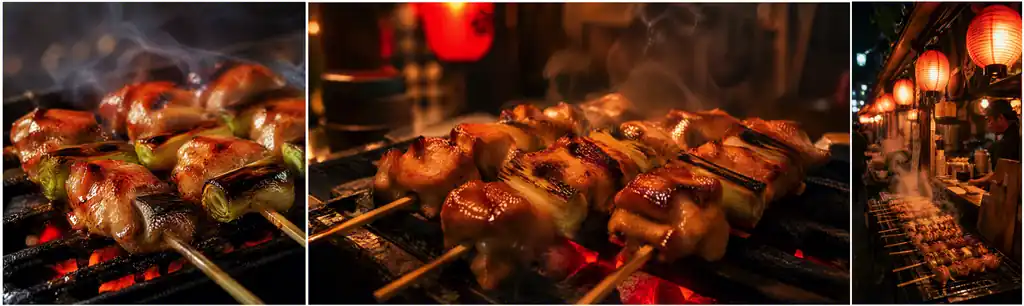
The food imagery is AI-generated for the design, rather than a photograph of the booth's actual dishes.
Oh, look at that. Pretty good, right?
Notice what the prompt gives Cheso beyond the name of the food: the grill, the smoke, the warmth, and the atmosphere of a stall. Those details help the image tell the same story as the poster.
You can also describe the composition you need. If the headline will sit at the top, ask for some space there. If the skewers are the star, ask for a closer view. One strong food image usually does more for a small poster than a crowded collage of everything on the menu.
The goal is simple: make people understand what you're selling—and wish they were eating it already.
3. Turn the idea and visuals into a poster
All right, we have a direction, some copy ideas, and delicious-looking food. Time to make the actual poster. Come on, let's put it together!
Tell Cheso the format, the event details, and the design choices you want it to use. The brief below uses example festival details; swap in your own date, time, venue, and booth number.
Love it! Now let's turn those visuals into a vertical poster for our university's International Food Festival! We're running the Japanese yakitori booth, so keep it fun and student-friendly. Go for a Japanese matsuri vibe with warm reds, cream tones, and bold typography. Make "YAKITORI" the big headline. Event details: October 18, 2026, 12–5 PM, Campus Main Quad, Booth J-07. Add a catchy tagline like "A Taste of Japan!"
About five minutes later in this example, the first poster appeared. Take a look:
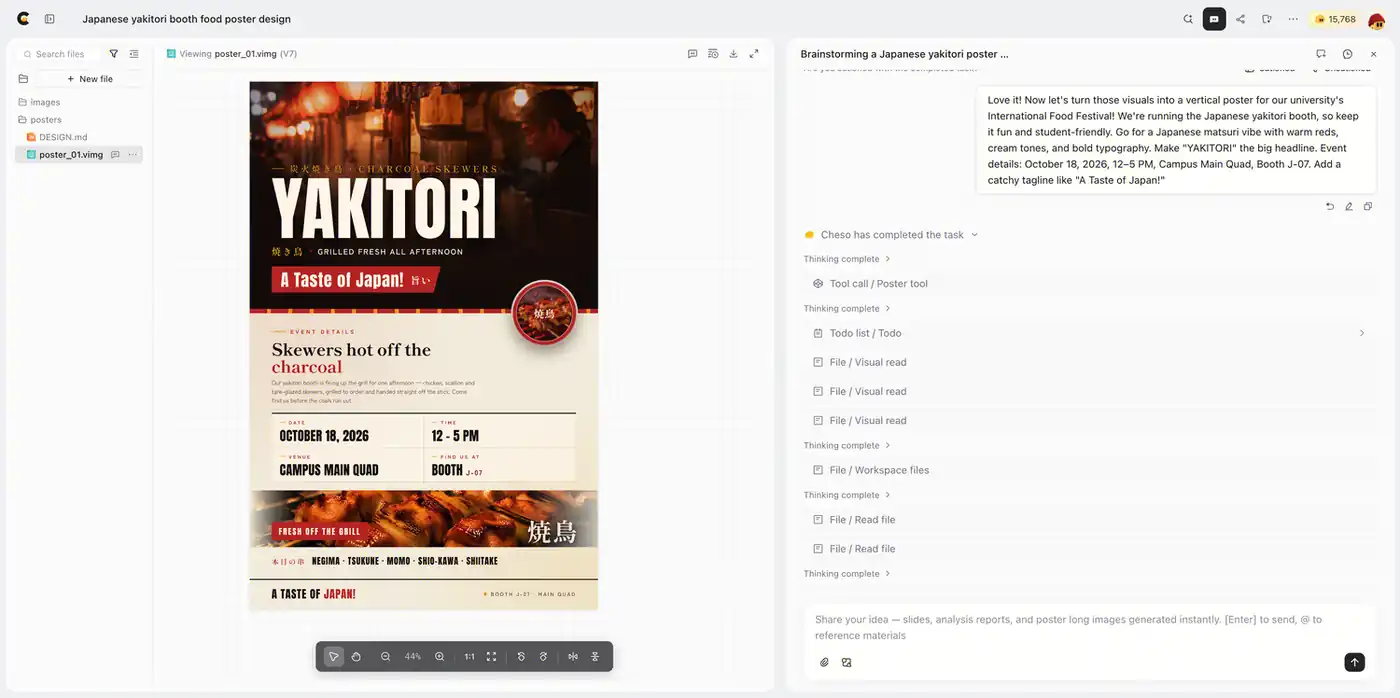
The first design brings the food imagery, headline, and festival information into a vertical poster.
This prompt works because it gives the design a job. "YAKITORI" tells people what the booth sells. The Japanese matsuri—a festival—direction sets the atmosphere. The date, time, location, and booth number tell people how to find us.
For a food booth, add the actual menu and prices to your brief, too. Include portion choices, spice options, or a special offer if you have them. Students shouldn't have to complete a tiny scavenger hunt to discover what one skewer costs.
It also helps to say what matters most. A sensible order for this poster is the food name first, the tempting image next, and the event details in a clear information block. Supporting copy can stay short. A poster is an invitation, not a novel with a chicken on the cover.
4. Refine it until it feels like your event
Of course, the first design might leave you thinking, "Nice! But could we change this little thing?"
Absolutely. Keep the conversation going and explain what you want to adjust. You don't need to throw away the whole direction because the spacing needs work or the food could stand out more.
For this poster, I wanted more Japanese festival details and a stronger campus-event feeling, rather than something that looked mainly like a restaurant ad. So I said:
Looking great! Can we make the skewers pop a bit more and add some playful Japanese festival details, like lanterns or small decorative touches? Keep it lively, warm, and student-friendly, with more of a campus event feel than a restaurant ad. Polish the typography and spacing, make the event details clear so it looks great both as a campus poster and on Instagram.
And here's the final version:
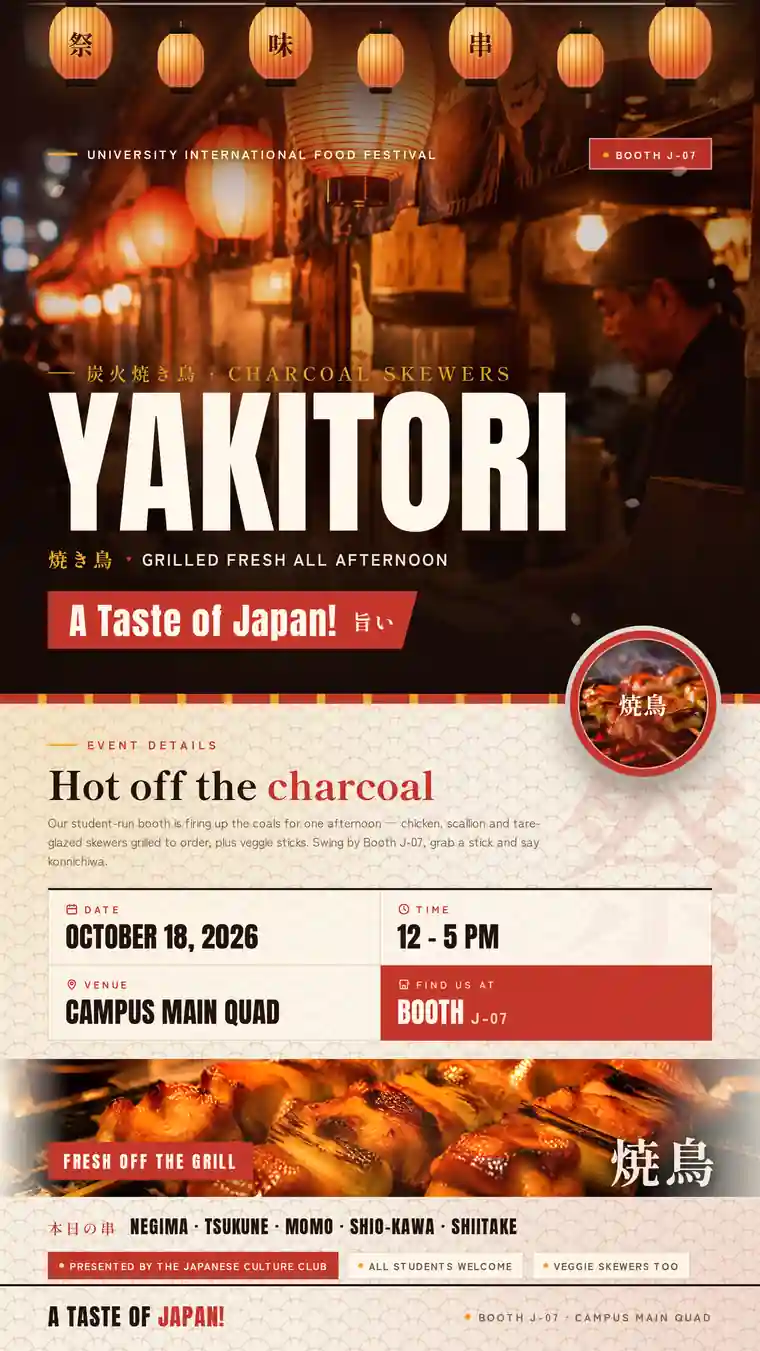
The final pass adds festival atmosphere while keeping the food and event information at the center of the design.
The follow-up is specific about both the feeling and the changes: make the skewers more prominent, add playful festival touches, and improve the type and spacing. That gives Cheso a clearer direction than "make it better," which is a perfectly understandable feeling but not a very helpful brief.
When you ask for a revision, name what you want to keep as well as what you want to change. For example: keep the food artwork and headline, but give the date and location more breathing room. Or keep the warm atmosphere, but reduce the decorative details around the information.
And mention where the poster will appear. A campus noticeboard and an Instagram post are different viewing situations. The headline and key details need to work for someone walking past as well as someone scrolling on a phone.
Small, concrete requests are how a nice first draft becomes a poster that feels right for your event.
Let your poster do the inviting
That's the workflow: explain the event, brainstorm a direction, create the visuals, build the poster, and keep refining it in the same Cheso conversation.
Whether you're organizing a food festival booth, a club recruitment day, or a campus fundraiser, start with the same questions: What is happening? Who are we inviting? What should they notice first? Give those answers to Cheso, then shape the design around them.
Ready for your next event? Create your campus event poster with Cheso and give people a reason to stop, look, and come over.
As for me, I'm still negotiating that one-skewer payment. If anyone knows how to appeal a two-thirds family tax, please let me know. My stomach and I would be very grateful.